Placeholders
These are all of the placeholders and special characters you can use in skills and mechanics that use strings. There are some examples of usage at the bottom to get you started.
Note: Usage of many variables in skills are locked to the premium versions, excluding MMOCore, special characters, color codes, and setvariable.
Special Characters
| Placeholder | Function | Symbol |
|---|---|---|
| <&co> | Returns a colon | : |
| <&sq> | Returns an apostrophe | ' |
| <&da> | Returns a dash | - |
| <&bs> | Returns a backslash | \ |
| <&fs> | Returns a forward slash | / |
| <&sp> | Returns a space | |
| <&cm> | Returns a comma | , |
| <&sc> | Returns a semicolon | ; |
| <&eq> | Returns an equals symbol | = |
| <&dq> | Returns double quotes | " |
| <&rb> | Returns a right bracket | ] |
| <&lb> | Returns a left bracket | [ |
| <&rc> | Returns a right curly bracket | } |
| <&lc> | Returns a left curly bracket | { |
| <&nm> | Returns a number sign | # |
| <&nl> | Forces a new line | |
| <&heart> | Returns a heart | ❤ |
| <&skull> | Returns a skull and bones | ☠ |
| <<> | Returns the less than symbol | < |
| <>> | Returns the greater than symbol | > |
| <^dot> | Returns a dot | . |
| <^dot2> | Returns the placeholder that returns a dot. Useful when there is sensitive placeholder parsing involved | <^dot> |
Color Codes
These color codes work anywhere in mob- and skill-files. They will even properly format tellraw-commands used in command skills!
Legacy color codes:
| Code | Color | Code | Color |
|---|---|---|---|
| &0 | Black | &B | Aqua |
| &1 | Dark Blue | &C | Red |
| &2 | Dark Green | &D | Light Purple |
| &3 | Dark Aqua | &E | Yellow |
| &4 | Dark Red | &F | White |
| &5 | Dark Purple | &K | Magic |
| &6 | Gold | &L | Bold |
| &7 | Gray | &M | Strike through |
| &8 | Dark Gray | &N | Underline |
| &9 | Blue | &O | Italic |
| &A | Green | &R | Reset |
It's recommended that you use MiniMessage tags for text styling and text decorations. Here's an example using MiniMessage tags:
MessageSkill:
  Skills:
    - message{m=<rainbow>This text is a rainbow</rainbow> but <red>this is red</red>!} @target
    - message{m=<#bae5f4>This is a cool color that I picked from</#bae5f4> <red><click:open_url:https://www.color-hex.com/color/bae5f4>color-hex site</click></red>} @target
MiniMessage also has a web viewer to see what your text will look like in game.
Additional Placeholders
Links to placeholders added by addon plugins. Any placeholders from these links will not work without that plugin installed.
Placeholders
Scoped Placeholders
Most placeholders that fetches data "from the environment" have a scope prepended to them. You can see the scope as "telling the placeholder" which entity or location to fetch the data from.
::include{file=/Skills/Placeholders/Scoped-Placeholder-Table.md}
So, for instance, the <caster.name> placeholder will be retuning the name of the mechanic's caster, while <target.name> will also be returning a name, but this time it will be that of the mechanic's target
  Skills:
  - message{m=Hello <target.name>, i am <caster.name>} @NearestPlayer
| Placeholder | Function | Return Type |
|---|---|---|
| <{scope}.absorption> | Returns the entity's current absorption (golden) health, or 0 if it has none. Alias: absorb |
Double |
| <{scope}.armor> | Returns the entity's armor value | Double |
| <{scope}.attack_cooldown> | Returns the attack cooldown of the player's equipped item. The value will be a double between 0 (maximum cooldown for the item) and 1 (no cooldown) | Double |
<{scope}.aura.{auraName}.stacks> |
Returns the entity's amount of stacks for the specified aura | Integer |
| <{scope}.block.data> | Returns the location block's data | String |
| <{scope}.block.hardness> | Returns the location block's hardness | Float |
| <{scope}.block.type> | Returns the location block's type | String |
| <{scope}.children> | Returns a list of the entity children's uuids | List |
| <{scope}.children.size> | Returns the amount of children the entity has | Integer |
| <{scope}.cinematic.active> | Returns whether the player is in an active cinematic camera (true/false) |
String |
| <{scope}.cinematic.frame> | Returns the ticks played since the active cinematic started, or -1 if none |
Integer |
| <{scope}.cinematic.progress> | Returns the progress of the active cinematic from 0.0 to 1.0, or 0.0 if none |
Double |
| <{scope}.damage> | Returns the entity's Attack_Damage attribute value | Double |
| <{scope}.display> | Returns the entity's displayed name | String |
| <{scope}.distance> | Returns the distance between the entity and the caster | Double |
| <{scope}.distancesquared> | Returns the distance between the entity and the caster, squared. Realistically speaking, you should never need this. |
Double |
<{scope}.enchantlevel.{enchantname}> |
Returns the total amount of levels the entity has for the specified enchant. (the levels on all slots are summed) | Integer |
| <{scope}.item> | For Item entities, returns its item | Item |
| <{scope}.item.amount> | For Item entities, returns the item's amount. Otherwise, returns 0 | Integer |
| <{scope}.item.model> | For Item entities, returns the item's custom model data. Otherwise, returns 0 | Integer |
<{scope}.item.itemstack.{slot}> |
Returns the itemstack of the item in the entity's slot |
String |
| <{scope}.item.type> | For Item entities, returns the item's type. Otherwise, returns AIR | String |
<{scope}.itemcount.{material/item}> |
Returns how many of the given vanilla material or Mythic item id the player has in their inventory | Integer |
| <{scope}.entity_type> | Returns the type of the entity | String |
| <{scope}.faction> | Returns entity's faction | String |
| <{scope}.fovoffset{rotation=0;absolute=true}> | Returns the angular offset (in degrees) between the direction the caster is looking and the direction from the caster to the target entity. This offset can be used to determine how far the target is from the caster's center of view | Double |
| <{scope}.globalcooldown> | Returns the entity's global cooldown | Integer |
| <{scope}.hp> | Returns the entity's health | Double |
| <{scope}.php> | Returns the entity's health percent | Double |
| <{scope}.mhp> | Returns the entity's max health | Double |
<{scope}.heldenchantlevel.{enchantname}> |
Returns the levels the entity has for the specified enchant in the HAND slot | Integer |
| <{scope}.held.item> | Returns the entity's held item | Item |
<{scope}.input.{inputType key}> |
Returns whether the player entity is pressing the specified {inputType key}.Available keys are forward, backward, left, right, jump, sneak, sprint.In case the key is being pressed, returns 1, otherwise 0 |
Integer |
| <{scope}.lastsignal> | Returns the entity's last received signal | String |
| <{scope}.level> | Returns the entity's (mythic) level | Double |
| <{scope}.l.pitch> | Returns the location's pitch | Double |
| <{scope}.l.yaw> | Returns the location's yaw | Double |
| <{scope}.l.w> | Returns the location's world | String |
| <{scope}.l.x> | Returns the location's centered x coordinate | Double |
| <{scope}.l.x.double> | Returns the location's precise x coordinate | Double |
| <{scope}.l.y> | Returns the location's centered y coordinate | Double |
| <{scope}.l.y.double> | Returns the location's precise y coordinate | Double |
| <{scope}.l.z> | Returns the location's centered z coordinate | Double |
| <{scope}.l.z.double> | Returns the location's precise z coordinate | Double |
| <{scope}.luck> | Returns the entity's luck | Double |
| <{scope}.mythic_type> | Returns the entity's mythic type (internal mythic id) | String |
| <{scope}.name> | Returns the entity's name | String |
<{scope}.pity.{category}> |
Returns the entity's pity for the given category | Double |
| <{scope}.raytrace{maxdistance=4.5}> | Returns the name of the block being looked at by the entity if within maxdistance range (defaults to 4.5),. If no block is found, AIR is returned. |
|
<{scope}.skill.{Metaskill}.cooldown> |
Returns the entity's current cooldown of the give skill as a float number | Float |
| <{scope}.stance> | Returns the current stance of the entity | String |
| <{scope}.stat.[Stat]> | Returns the value of the specified {Stat} on the entity | Float |
| <{scope}.threat> | Returns the amount of threat the caster has towards the entity | Double |
<{scope}.throwstrength.{component}> |
Returns the throw strength in a throw context. {component}: horizontal, vertical, or total (default) |
Double |
| <{scope}.tt.top> | Returns the name of the top threat holder of the entity | String |
| <{scope}.tt.size> | Returns how many entities are on the entity's threat table | Integer |
| <{scope}.type> | Returns the internal id of a MythicMob or the entity name otherwise | String |
| <{scope}.type.name> | Returns the display name of a MythicMob or the entity name otherwise | String |
| <{scope}.uuid> | Returns the UUID of the entity | String |
| <{scope}.velocity> | Returns the entity's velocity | Double |
<{scope}.velocity.global.{component}> |
Returns the entity's velocity in world space. {component}: x, y, z, or total (default) |
Double |
<{scope}.velocity.relative.{component}> |
Returns the entity's velocity in its local frame. {component}: x, y, z, or total (default) |
Double |
| <{scope}.ydiff> | Returns the difference in the y value between the caster and the location | Double |
Misc Placeholders
| Placeholder | Function | Return Type |
|---|---|---|
| <drop.amount> | Returns the amount dropped while used in specific drop types | |
| <drops.xp> | Returns the xp dropped via specific drop types | |
| <drops.money> | Returns the money dropped through the vault plug-in | |
| <echo.[text]> | Returns the given text after the placeholders inside it are parsed | String |
| <random.#to#> | Returns a random integer in the specified range | |
| <random.float.#to#> | Returns a random float number in the specified range | |
| <random.float.rounded.#to#> | Returns a random float in the specified range, rounded to 2 decimals | String |
| <random.uuid> | Returns a random uuid | String |
| <utils.epoch> | Returns the current epoch | Long |
| <utils.epoch.seconds> | Returns the current epoch | Long |
| <utils.epoch.timestamp> | Returns the amount of milliseconds elapsed since the epoch | Long |
| <utils.epoch.millis> | Returns the amount of milliseconds of the current epoch | Long |
| <utils.epoch.ticks> | Returns the current epoch, converted in ticks. Assumes that the server always maintains 20 ticks per second. Accounts for milliseconds. While unorthodox, since time within Minecraft (and by extension Mythic) is measured in ticks, this may be of some help streamlining some processes where converting the normal epoch time to accomodate for ticks may be burdensome if done at scale |
Long |
| <skill.[skill].charges> | Returns the available charges of the given skill for the caster | Integer |
| <skill.[skill].maxcharges> | Returns the maximum charges configured for the given skill | Integer |
| <skill.[skill].overflowcharges> | Returns the overflow charges of the given skill for the caster | Integer |
| <skill.power> | Returns the power of the metaskill in which the placeholder is evaluated | Float |
| <skill.targets> | Returns the amount of inherited targets | Integer |
| <spawner.pir> | Returns the amount of players in the spawner's radius | Integer |
| <char.[String]> | Returns the given Unicode identifier to the respective character (<char.007B> --> {)The identifier can optionally be prepended with \uThis is intended to be used inside of other placeholders or other similar context, where the load order is important. For instance, all special characters will be replaced even before normal placeholders are, so, if you wanted to use those special characters inside of sensitive contexts, you may find that they are replaced too early. This can be solved by using this placeholder |
String |
Item Placeholders
| Placeholder | Function | Return Type |
|---|---|---|
| <item.amount> | Returns the amount of the item that triggered the skill | Integer |
| <item.droplevel> | Returns the drop level of the item, if this is a drop. Otherwise, behaves like <item.amount> |
Integer |
| <{scope}.slot.item.[slot]> | Returns the item in the entity's [slot] as a drillable item that supports item meta keywords, e.g. <caster.slot.item.HAND.amount>. [slot] is an equipment slot name (HAND, OFFHAND, HEAD, CHEST, LEGS, FEET) or, for players, an inventory slot index. Returns AIR if the slot is empty |
Item |
| <mythicitem.[MythicItem].material> | Returns the material of the specified mythic item | String |
| <mythicitem.[MythicItem].model> | Returns the custommodeldata of the specified mythic item | String |
| <mythicitem.[MythicItem].display> | Returns the display name of the specified mythic item | String |
| <mythicitem.[MythicItem].lore> | Returns the lore of the specified mythic item, one line per lore line. Placeholders in the lore are parsed | String |
| <mythicitem.[MythicItem].itemstack> | Returns the itemstack of the specified mythic item | String |
Score Placeholders
| Placeholder | Function | Return Type |
|---|---|---|
| <{scope}.score.[Objective]> | Returns the score of the scoped entity from "{Objective}" | Integer |
| <global.score.[Objective]> | Returns the score of fake player: __GLOBAL__ score from "{Objective}" | Integer |
| <score.objective.player> | Returns the score of the defined player from "objective" | Integer |
| <score.objective.dummyname> | Returns the score of "dummyname" (fake player) from "objective" | Integer |
Text Placeholders
| Placeholder | Function | Return Type |
|---|---|---|
| <bar{value=0;maxValue=100;length=100;remainingSymbol="#";progressSymbol="#";remainingPrefix=;progressPrefix=}> | Returns a formatted bar with the specified values | String |
| <centertext{value=The text to center;pixelwidth=100;singlepixelunicodes= , , , ;bold=false}> | Centers the given text. The attributes are:value/v/text/line: The text to centerpixelwidth/width/w/pw: The total pixels (integer) to account for (will center at half the width)bold/b: Whether the provided value is boldedsinglepixelunicodes/spus: A list of unicodes of 1-3 pixels to use for extra precision. Defaults to " , , , " |
String |
Variable Placeholders
These placeholders will return whatever variable has been called. For instance <caster.var.[name]> will return the value of the caster's [name] variable.
Some of these variables are only generated and available under some special circumstances, such as some specific trigger/attribute/metamechanic being used previously in the skilltree.
| Variable Placeholder | Function | Return Type | Generated by |
|---|---|---|---|
| <dialog.[key]> | Returns the value submitted for the [key] input of an open dialog (shorthand for <skill.var.dialog.[key]>). <dialog.button> returns the clicked button index | String | showDialog mechanic |
| <caster.var.[VariableName]> | Returns the value of the variable {VariableName} on the variable registry of the caster of the mechanic | ||
| <target.var.[VariableName]> | Returns the value of the variable {VariableName} on the variable registry of the target of the mechanic | ||
| <world.var.[VariableName]> | Returns the value of the variable {VariableName} on the variable registry of the world the mechanic is used in | ||
| <global.var.[VariableName]> | Returns the value of the variable {VariableName} on the variable registry of the whole server | ||
| <skill.var.[VariableName]> | Returns the value of the variable {VariableName} on the current skill tree | ||
| <skill.var.damage-amount> | Returns the amount of damage taken or done | ~onDamaged trigger ~onAttack trigger ~onBowHit trigger onDamaged mechanic onAttack mechanic |
|
| <skill.var.damage-type> | Returns the type of damage taken or done, if any. When the damage has no element, returns the comma-separated damage tags instead, or SKILL if there are none. Also populated on the onDamaged path |
~onDamaged trigger ~onAttack trigger ~onBowHit trigger onDamaged mechanic onAttack mechanic |
|
| <skill.var.damage-tags> | Returns the comma-separated list of the damage's tags, if any | ~onDamaged trigger ~onAttack trigger ~onBowHit trigger onDamaged mechanic onAttack mechanic |
|
| <skill.var.damage-cause> | Returns the cause of damage taken/done | ~onDamaged trigger ~onAttack trigger ~onBowHit trigger onDamaged mechanic onAttack mechanic |
|
| <skill.var.aura-name> | Returns the name of the aura | Every aura mechanic | |
| <skill.var.aura-type> | Returns the type of the aura | Every aura mechanic | |
| <skill.var.aura-charges> | Returns the amount of charges the aura has left | Every aura mechanic | |
| <skill.var.aura-duration> | Returns the remaining duration of the aura | Every aura mechanic | |
| <skill.var.aura-duration-millis> | Returns the remaining duration of the aura, in milliseconds | Every aura mechanic | |
| <skill.var.aura-stacks> | Returns the amount of stacks the aura has left | Every aura mechanic | |
| <skill.var.input> | Returns the chat input | onChat mechanic | |
| <skill.var.interval> | Returns the current iteration | Using the repeat and repeatInterval universal attributes |
|
| <skill.var.itr> | Returns the current iteration | Using the repeat and repeatInterval universal attributes |
|
| <skill.var.volume> | Returns a float value between 1 and 15 representing the intensity of the sound. Directly proportional to the distance (the further away the source, the higher this value) | ~onHear trigger | |
| <skill.var.sound-type> | Returns the type of the sound | ~onHear trigger | |
| <skill.var.hit-block-type> | Returns the block that was hit, or AIR if none | raytrace mechanic | |
| <skill.var.bow-tension> | Returns the force with which the projectile has been shot | ~onShoot trigger | |
| <skill.var.click-type> | The type of the click used to interact with a menu button. Returns 1 if rightclick was used, 0 otherwise |
Custom Menus Interactions |
  Skills:
  - setvariable{var=caster.test1;val=1} @self
  - setvariable{var=target.test2;val=2} @self
  - message{m=<caster.var.test1> <caster.var.test2> <target.var.test1> <target.var.test2>} @self
If you execute this metaskill yourself, this will send you a message saying
1 2 1 2because the target of every mechanic is the caster, so the affected registry is always the caster's even if a "target" scope is used
Meta Placeholders
You may now be wondering "Ok, but what is that Return Type listen after the placeholder's explanation?"
That value determines
- What data the placeholder is returning and, subsequently
- What Meta Placeholders you can use to mutate it!
For instance... do you want to uppercase a string? Why not use
<caster.name.uppercase>
Do you want to remove possible whitespace characters from the edges? then you can also
<caster.name.uppercase.trim>
See the full documentation HERE
Placeholder Attributes
Some placeholders can use a set of attributes to further define the output they will give
All placeholders
| Attribute | Aliases | Description | Default |
|---|---|---|---|
| default | def, | | The default value returned if the placeholder is unable to fetch its intended value | UNDEFINED |
Double Return Type Placeholders
| Attribute | Aliases | Description | Default |
|---|---|---|---|
| rounding | round, r | The rounding of the returned double value | 2 |
  Skills:
  - message{m="<target.hp{round=2}>"} @self
PlaceholderAPI Integration
Other than being able to use PlaceholderAPI placeholders anywhere placeholder support is in place, MythicMobs introduces some new PAPI placeholders that can be used by third parties to fetch MythicMobs-related values.
| PAPI Placeholder | Function |
|---|---|
| %mythic_var_someVar% | Returns the value of the someVar variable that is set on the player |
| %mythic_var_world_someVar% | Returns the value of the someVar variable that is set on the world |
| %mythic_var_global_someVar% | Returns the value of the someVar variable that is set on the server |
| %mythic_var_<playerName>_someVar% | Returns the value of the someVar variable that is set on the specified player, by their name |
| %mythic_var_<UUID>_someVar% | Returns the value of the someVar variable that is set on the specified entity, by its UUID |
| %mythic_spawner_[name]_cooldown% | Returns the cooldown of the spawner called name |
| %mythic_spawner_[name]_cooldownleft% | Returns the remaining cooldown of the spawner called name |
| %mythic_spawner_[name]_warmup% | Returns the warmup of the spawner called name |
| %mythic_spawner_[name]_warmupleft% | Returns the remaining warmup of the spawner called name |
| %mythic_stat_[name]% | Returns the value of the specified stat on the evaluated player |
PlaceholderAPI Parsing
When using placeholders via PlaceholderAPI, it is important to remember that some of them are meant to be parsed against a player, and if parsed against a mob they may behave unexpectedly.
More concretely, this means that:
- If used inside a mechanic, the target must be a player
- If used inside a condition, the checked entity must be a player (caster for conditions, inherited targets for targetconditions, trigger for triggerconditions)
...and so on
Custom Placeholders
It's possible to create custom placeholders in any Pack by creating a file named placeholders.yml in the pack directory. These can be static or you can define conditional placeholders - the first one that evaluates true will be chosen, or the Default if they're all false.
Custom placeholders can be used via <placeholder.[CustomPlaceholder]>, with [CustomPlaceholder] being the name of your custom placeholder.
TestPlaceholder: 'some value'

TestConditionalPlaceholder:
  Day:
    Conditions:
    - day
    Value: day
  Night:
    Conditions:
    - night
    Value: night
  Default: idk

TestRandomPlaceholder:
- red
- green
- blue
A value of "null" is not accepted
Static Placeholders
Placeholders are considered "Static" when their parsing can only ever result in a single, defined output.
As of now, this is only the case for Custom Placeholders that have a single possible value
TestPlaceholder: 'a single value'
AnotherTestPlaceholder: 'another single value'
Load-Time Static Placeholder Parsing
Static Placeholders not parsed when the configuration line is executed at runtime, but are parsed and replaced as soon as the configuration is loaded in, only once per reload, and before any other parsing is done.
This has numerous advantages!
The most obvious one is that of performance: If placeholders are replaced at load time, at runtime they will appear as normal strings, not needing to be parsed again and saving on resources.
There is also quite an interesting application to this: since static placeholders are parsed and replaced before anything else is, they can be used anywhere in the configuration files, even in places where normal placeholders would not make sense, such as internal names, mechanic names or anything else!
# placeholders.yml
test: "message=1;"
debug: "#log"
testPreparsedPlaceholders:
  Skills:
  - message{<placeholder.test>} @self
  - <placeholder.debug>{message="hello world"}
Examples
This will make a mob send a teal message to all players in a radius of 20 blocks around in itself, stating what entity killed it in green.
    Skills:
    - message{m="<&b><caster.name><&r> was slain by <&a><trigger.name><&r>."} @PIR{r=20} ~onDeath
This skill will make an announcement when the mob spawns that looks like this:

  Skills:
  - Skill{s=SaveBossLocation} @self ~onSpawn
  - message{m="&eA &BGiant Zombie&e (Level &4<caster.level>&e) &ehas spawned at <caster.var.SpawnLoc>"} ~onSpawn @PlayersInWorld
  - message{m="&eThe &BGiant Zombie&e (Level &4<caster.level>&e) &espawned at <caster.var.SpawnLoc>&e has been slain."} ~onDeath @PlayersInWorld
Be sure to place this skill somewhere in the skills file
SaveBossLocation:
  Skills:
  - setvariable{var=SpawnLoc;type=STRING;value="&b<caster.l.x>&e, &b<caster.l.y>&e, &b<caster.l.z>";scope=CASTER} @self
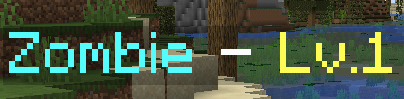
You can also use color tags and formatting tags to make the mobs have pretty names:
ZOMBIE:
  Display: 'ZOMBIE &F- &A<caster.hp>/<caster.mhp>HP &F- &ELv.<caster.level>'