Levels
Mob levels are a useful function for adding levels to your mob, which allow for several useful features.
For example, you can have the mob's damage and health scale up as their level increases, or you can have them drop more items depending on what their level is (see BonusLevelItems in Droptable Options).
Or, for more advanced configs you could change their drops completely depending on what level they are, give them different skills depending on their level, or even change where/how they spawn depending on what level they are (using spawners and randomspawns.)
Mob levels can also be influenced by world scaling (see below), Random Spawners or the SetLevel mechanic.
Zombie:
  Type: zombie
  Health: 100
  Damage: 10
  Display: '&5Zombie Lvl - <caster.level>'
  Options:
    MovementSpeed: 0.3
  Drops:
  - myDroptable
  LevelModifiers:
    Health: 5
    Damage: 0.5
Level
Sets the mob's default level. Place it at the top level of the mob definition. The value can be a fixed number, or a range written as minTOmax, in which case a random integer between the two values (inclusive) is rolled each time the mob spawns. A dash form like 3-7 is also accepted.
SkeletonKing:
  Type: skeleton
  Level: 5
SkeletonPack:
  Type: skeleton
  Level: 3to7
This value is used whenever the mob is spawned without a level being given, such as from a spawner, /mm mobs spawn, a totem, or a mob bullet. Spawn sources that specify their own level override it, including the summon mechanic (which defaults to the caster's level) and the setlevel mechanic. If unset, the level defaults to 1, and the final spawn level is never lower than 1. An invalid value logs a config error and falls back to 1.
The keys MobLevel and Options.Level are accepted as aliases of Level.
LevelModifiers
These options, put under the LevelModifiers section, will increase the mobs respective stats by the given numbers per level. These stats will be added on top of their base stats.
Level modifiers may not work if you didn't specify base values for the affected attributes in the mob configuration.
  LevelModifiers:
    Health: [number]
    Damage: [number]
    KnockbackResistance: [number]
    Power: [number]
    Armor: [number]
    MovementSpeed: [number]
World Scaling
Mob levels (for random-spawned mobs) can automatically be set by the plugin by specifying world scaling settings located in /MythicMobs/config/config-mobs.yml. Setting it up is simple. By default the section for scaling in your config-mobs.yml should look something like this:
  MobLeveling:
    # Used to scale a mob's attributes as they level up
    ScalingEquations:
      Health: V * ((1.05)^(L-1))
      Damage: V * ((1.05)^(L-1))
      Scale: V
    # Alternate legacy method of scaling mobs attributes
    DefaultLevelModifiers:
      Health: 0.1
      Armor: 0
      Damage: 0
      KnockbackResistance: 0
      Power: 0
    # Per-world scaling options
    WorldScaling:
      Default:
        Enabled: true
        ScaleVanillaMobs: true
        PerBlocksFromSpawn: 250
      world2:
        Enabled: true
        PerBlocksFromSpawn: 250
      world2_nether:
        Enabled: false
        PerBlocksFromSpawn: 100
The above examples shows different worlds with different levels of scaling. Using "world2" as an example, the levels for randomspawned mobs would look something like this:
- Level 0 in the white area (0-249 blocks from spawn).
- Level 1 in the tan area (250-499 blocks distance).
- Level 2 in the yellow area (500-749 blocks distance).
- Level 3 in the orange area (750-999 blocks distance).
- Level 4 in the red area (1000-1249 blocks distance).
- Etc.
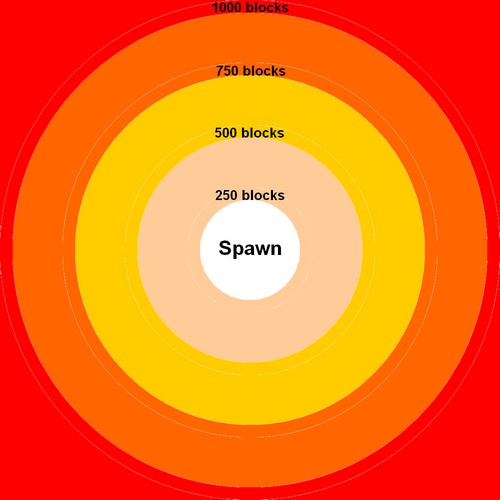
These options will automatically be applied to all mobs that are summoned into the game using MythicMobs' Random Spawning. You can use the UseWorldScaling: [true/false] option on your randomspawn configurations to control whether mobs are supposed to be affected by world scaling.
Note that world scaling options will never affect Vanilla Overrides unless the
ScaleVanillaMobsoption for that world is set totrue.