Compatibility
Some plugins that handle resource packs for your server may take extra steps to configure.
MythicHUD offers a simple export compatibility option in its /MythicHUD/config.yml:
copy-pack:
  enabled: false
  path: "Nexo/pack/external_packs/MythicHUD"
This configuration, when enabled, would copy the /MythicHUD/built-pack/ assets to another destination, such as /plugins/myPack/assets/ as configured above. You can send MythicHUD's assets to any pack management plugin/directory in this way.
Some plugins modify core shaders MythicHUD uses for its displays, and must be configured so they do not conflict with HUD rendering.
Crucible:
- Crucible can automatically pull MythicHUD's assets if its
/MythicMobs/config/config-generation.ymlis configured with
Generation:
  MergeMythicHUD: true
/hud reloadmust be used before/mm i generategenerates the Crucible resource pack to get HUD asset updates.
Nexo
- Nexo has a separate hook which can be enabled with
nexo-hook: true. This will handle merging of all files automatically, no need to change any setting or copy files manually. The MythicHUD ResourcePack will automatically be injected into Nexo when it generates it's ResourcePack
ItemsAdder
- In
ItemsAdder/config.ymldisable some text shader related elements:- Disable ItemsAdder Text Effects.
- Disable ItemsAdder Hide Scoreboard Numbers.
text_effects:
  enabled: false
  hide_scoreboard_numbers: false
  hide_scoreboard_numbers_old_clients: false
- Configure MythicHUD to send its pack assets to ItemsAdder in its
MythicHUD/config.yml:
copy-pack:
  enabled: true
  path: ItemsAdder/contents/mythichud/resourcepack
- for "hide exp level" to work also change the following settings in
plugins/itemsadder/config.yml
huds:
  enabled: false
  force_color:
    enabled: false
    color: '#FFFFFF'
Mod Compatibility
Lunar Client
Note: As of Lunar Client v2.22.16, there is no longer an issue and Lunar Client is compatible
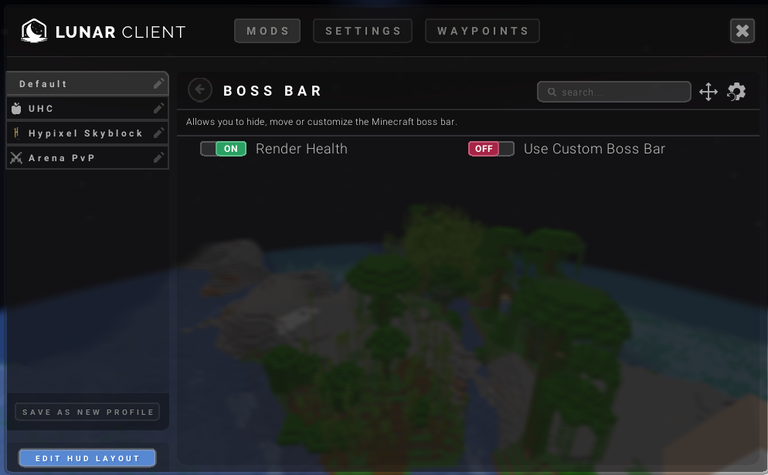
In order to make HUDs appear correctly on the Lunar Client, Boss Bar settings must be set to not use Custom Boss Bars.
Feather Client
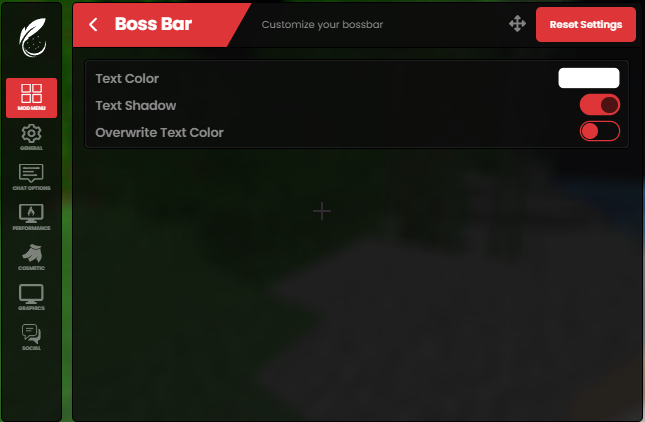
In order to make HUDs appear correctly on the Feather Client, Boss Bar settings must use White Text color, Text Shadow, and be set to not overwrite text color: